

Hardware-Level Identity Protection & Vault Defense
Safeguard your master passwords, authentication tokens, and hardware cryptochips. ByteShield audits your Windows TPM 2.0 state, Secure Boot integrity, and unencrypted browser credential stores to neutralize identity theft at the source.
Stop Information Stealers from Exposing Stored Logins
Modern info-stealers (RedLine, Vidar, Lumma) target unencrypted SQLite databases inside Chrome, Edge, and Firefox profiles. They extract cookies, saved passwords, and cryptocurrency seed phrases in milliseconds.
ByteShield Identity Protection inspects local browser profile stores, detects unauthenticated read attempts against the Windows DPAPI master key, and provides a hardware-isolated vault to store emergency recovery phrases and master secrets.
- Win32_Tpm.IsActivated_InitialValue PCR 7 / BitLocker Seal Verified
- %APPDATA%\Microsoft\Protect\{SID} DPAPI Master Key Access Guard
- Chrome\User Data\Default\Login Data SQLite Read Monitor Hooked
- Windows Credential Manager (lsass.exe) RunAsPPL Process Protection Check
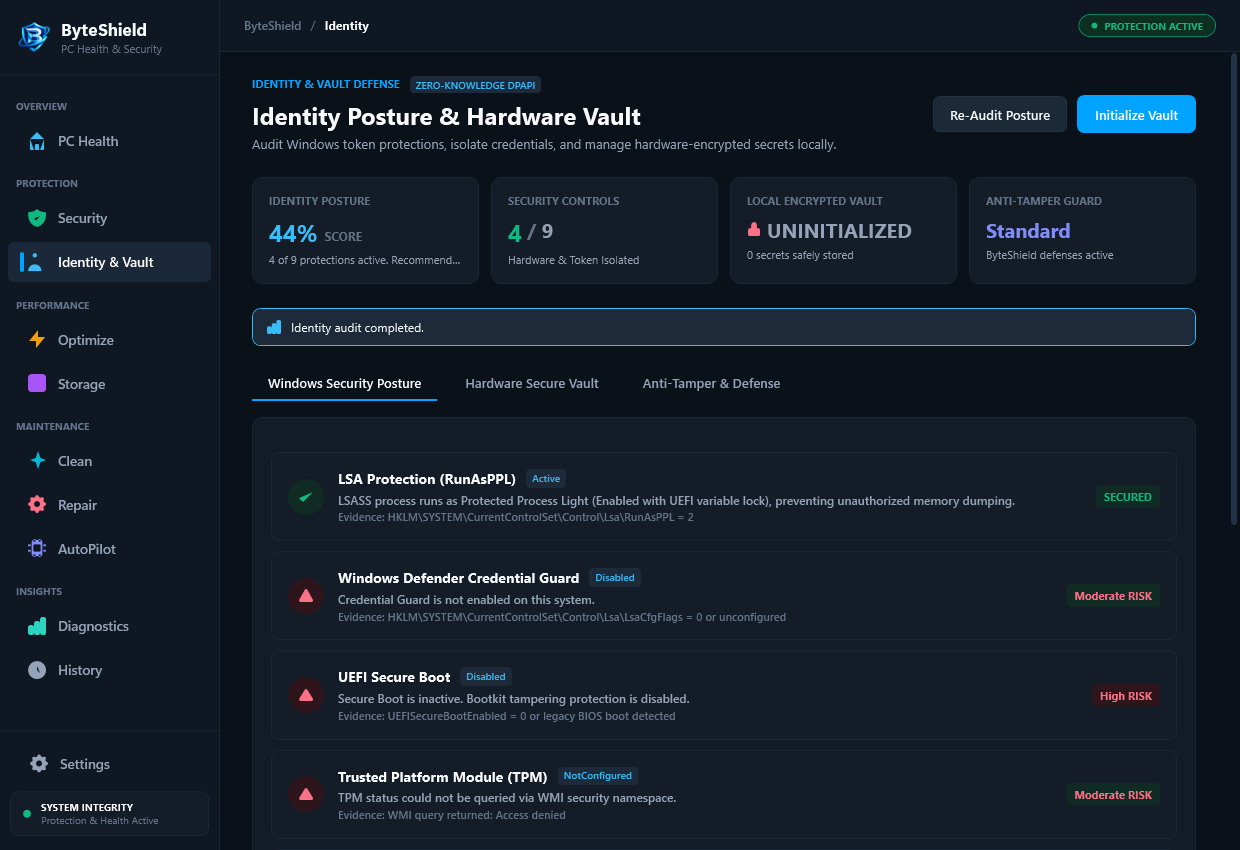
Three Lines of Hardware-Backed Defense
From the physical silicon chip on your motherboard to your daily web browser logins, ByteShield seals the vulnerabilities that modern malware exploits.
TPM 2.0 & BitLocker Verification
Queries motherboard firmware via WMI to confirm the Trusted Platform Module is initialized, owned, and bound to Platform Configuration Register (PCR) 7. Ensures BitLocker volume encryption cannot be bypassed via cold-boot attacks.
Credential Manager & LSA Guard
Audits Windows Local Security Authority Subsystem (LSASS) configuration. Checks whether Protected Process Light (RunAsPPL) and Credential Guard are enabled to block memory-scraping tools like Mimikatz from harvesting NTLM hashes.
Browser Secret Exposure Scanner
Scans common Chromium and Gecko profile directories for plain-text or lightly encrypted credential databases. Pinpoints unmasked passwords, session authentication cookies, and API tokens vulnerable to rogue executables.
How ByteShield Secures Your Identity
A deterministic 4-stage audit that verifies your physical security hardware, system credentials, and browser vaults in under 4 seconds.
Hardware Chip Handshake
ByteShield interrogates the motherboard TPM 2.0 module, verifying firmware revision, cryptographic endorsement keys, and PCR state.
Windows Subsystem Audit
Inspects LSASS memory protection flags, Windows Hello container health, and Active Directory / Local Credential Manager stores.
Browser Profile Inspection
Surfaces vulnerable session cookies and stored credentials across Chrome, Edge, Brave, and Firefox without transmitting any secret data.
Hardening Recommendations
Delivers single-click remediations to enable RunAsPPL, flush vulnerable session tokens, and lock private master keys into the Secure Vault.
Frequently Asked Questions About Identity Defense
Detailed explanations regarding Windows TPM, DPAPI cryptography, and local secret management.
No. ByteShield has no cloud server infrastructure for user credentials. All cryptographic audits and secure vault storage operate strictly on your local PC using Windows DPAPI and AES-256-GCM hardware instructions. Your passwords and keys never traverse the network.
The Trusted Platform Module (TPM 2.0) is a dedicated microchip on your motherboard designed to carry out cryptographic operations. ByteShield verifies that your TPM is active and bound to PCR 7, ensuring Windows Secure Boot and BitLocker cannot be circumvented by bootkit malware.
Info-stealers search known file paths such as `%LOCALAPPDATA%\Google\Chrome\User Data\Default\Login Data` to copy password databases. ByteShield identifies when untrusted background processes attempt to hook into these files or query the DPAPI decryption API, alerting you before credentials are compromised.
Protected Process Light (RunAsPPL) is a Windows security policy that prevents non-protected processes from opening handles to `lsass.exe` with administrative read privileges. ByteShield audits this setting and helps you enable it to stop password-dumping tools.
Because ByteShield enforces zero-knowledge architecture, there is no master recovery backdoor. If you encrypt secrets inside the local vault, only the user with the correct master passphrase or hardware token can decrypt them.
Not at all. The audit runs passively in user-space or during scheduled scans, consuming zero CPU cycles while you browse. It does not inject heavy browser extensions or modify your network proxy traffic.
Audit Your PC’s Security Posture Today
Verify your TPM chip, harden credential stores, and safeguard your private records with ByteShield.