

Real-Time PC Hardware Diagnostics
Gain immediate visibility into your computer's vital components. Direct motherboard sensor telemetry detects thermal bottlenecks and storage drive wear before hardware fails.
Direct Sensor Telemetry Without Unstable Drivers
Most third-party diagnostic software installs risky kernel drivers that trigger blue screens and conflict with anti-cheat software. ByteShield interfaces safely with native Windows ACPI, WMI, and Storage IOCTLs to deliver 100ms hardware telemetry safely.
Win32_PerfFormattedData_Counters_ProcessorInformationIOCTL_STORAGE_QUERY_PROPERTY • NVMe Health ProtocolACPI_BATTERY_STATUS • Cycle Count & Wear Ratio
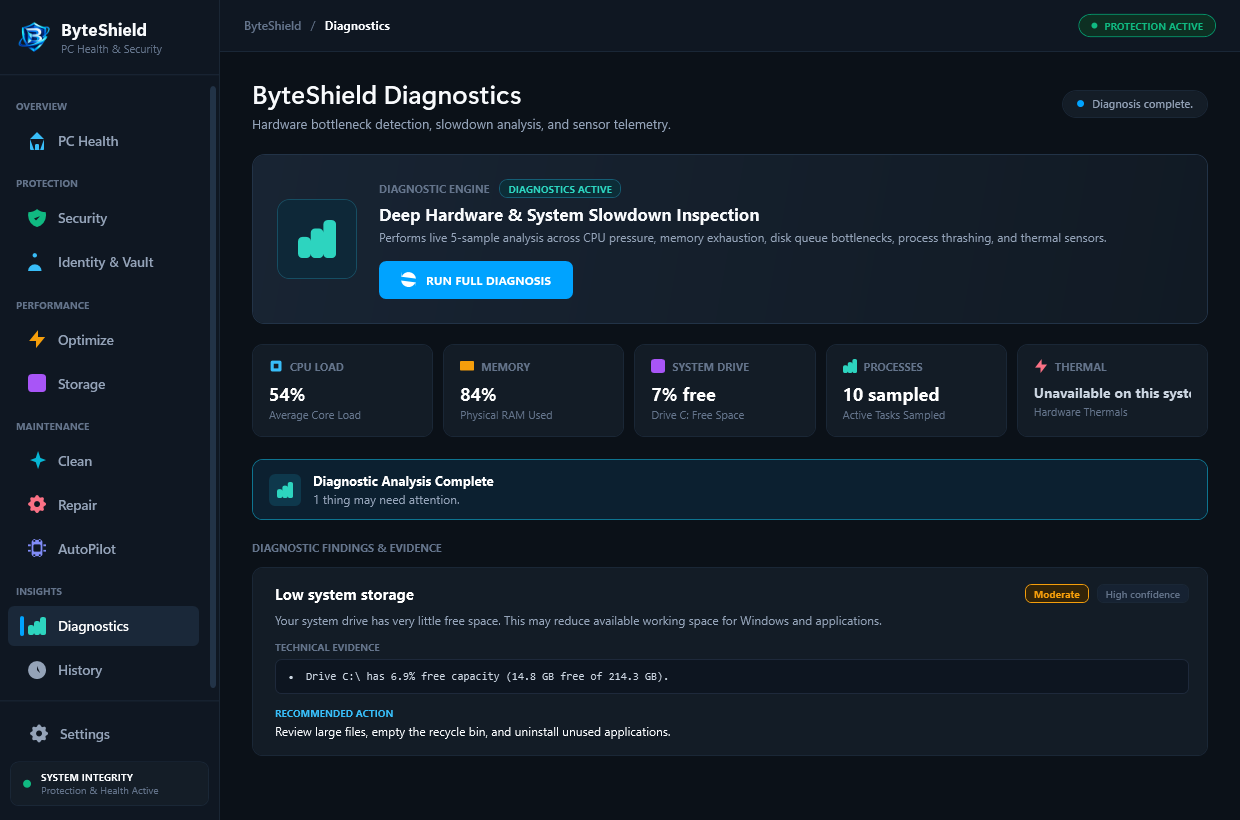
Sub-second hardware vitals refresh without CPU lag
Detects bad NVMe blocks weeks before drive death
Pinpoint dried thermal paste on Intel & AMD packages
Native user-mode WMI interfaces eliminate BSODs
Comprehensive Hardware Health Monitoring
From CPU packages to NVMe wear leveling, ByteShield delivers transparent telemetry without third-party kernel drivers.
NVMe & SSD SMART Vitals
Track remaining drive endurance, total terabytes written (TBW), reallocated sector counts, and operating temperatures for all internal and external NVMe/SATA drives.
CPU Thermal & Throttle Detection
Inspect package thermals across Intel and AMD processors. Receive real-time notifications if thermal paste degradation triggers clock speed throttling.
Memory Pressure & Leak Analysis
Identifies background software leaking commit charge over time. Alerts you before physical RAM depletion forces system freeze cycles.
How ByteShield Identifies Hardware Bottlenecks
From initial sensor query to actionable cooling and storage recommendations.
Sensor Discovery
Detects motherboard ACPI sensors, storage controllers, and processor topology using native Windows WMI interfaces.
Live Telemetry Polling
Polls thermals, fan RPM, and RAM pressure in 100ms non-blocking asynchronous cycles without causing micro-stutter.
Anomaly Flagging
Compares readings against hardware thermal envelopes and manufacturer SMART failure thresholds.
Actionable Advice
Presents clear guidance: from cleaning laptop fan exhausts to migrating files before an aging SSD fails completely.
Frequently Asked Diagnostics Questions
Answers to key questions regarding sensor accuracy, battery telemetry, and drive failure prevention.
No. ByteShield interfaces safely with standard Windows Management Instrumentation (WMI), Storage IOCTLs, and motherboard ACPI interfaces without installing risky third-party kernel drivers that can cause blue screens or conflict with game anti-cheat systems.
Yes. If CPU package temperatures exceed safe thresholds (such as 85°C sustained), ByteShield provides an instant alert indicating which processor cores are overheating so you can clean fan dust or inspect thermal paste degradation.
Every solid state drive (SSD/NVMe) has a rated endurance limit measured in Terabytes Written (TBW). ByteShield reads the drive controller's internal wear-leveling registry and displays remaining lifespan. When an SSD falls below 10% health, ByteShield alerts you to backup critical files immediately.
Yes. On Windows laptops, ByteShield queries the ACPI battery controller to display original factory design capacity (mWh), current full-charge capacity, wear degradation percentage, and total charge cycle counts.
ByteShield monitors non-paged and paged memory pools allocated by active Windows services. If an application continuously requests memory addresses without releasing them over several hours, ByteShield flags the specific process and displays its resource trajectory.
Negligible. Because ByteShield queries hardware registers via lightweight asynchronous IOCTLs rather than running heavy synthetic benchmarks, its background CPU draw remains below 0.3%, ensuring zero impact on battery endurance.
Inspect Your Hardware Health in Real Time
Download the free 7-day trial of ByteShield and baseline your CPU, SSD, and memory vitals.