

Heuristic Antivirus & Security Assessment
Defend your Windows workstation against modern malware, trojans, and zero-day ransomware. Operates in real time via the native Antimalware Scan Interface (AMSI) without slowing down games or apps.
Native AMSI Integration Stops Fileless Malware
Over 80% of modern malware attacks do not rely on traditional .exe files; they execute obfuscated PowerShell scripts, macro payloads, and in-memory injection. ByteShield hooks directly into the Windows Antimalware Scan Interface (AMSI) to analyze and neutralize code before it can execute in memory.
AmsiInitialize & AmsiScanBuffer • In-Memory HooksProcessMitigationPolicy • Exploit ProtectionCanaryWatch::TrapTrigger • 3ms Killswitch
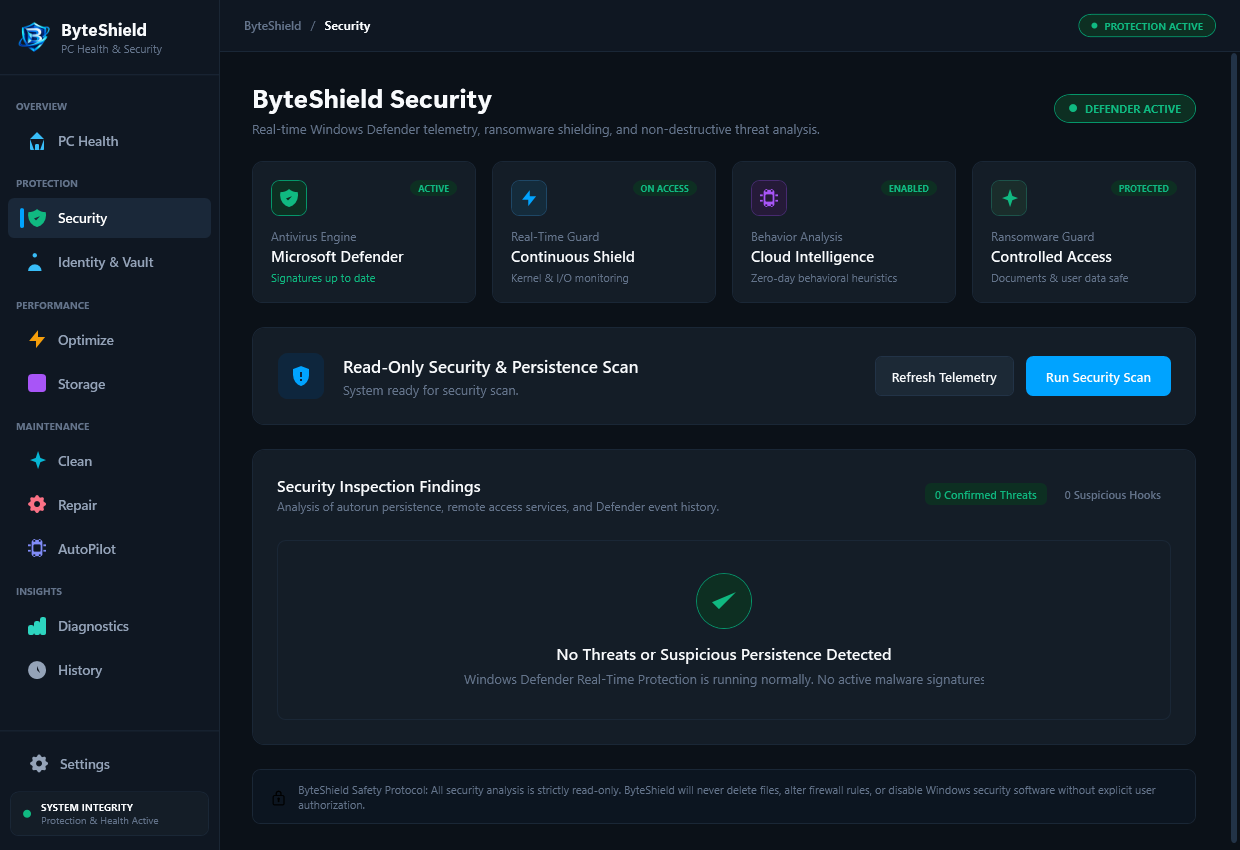
Lightest real-time Windows antivirus engine available
Zero frame drops during games or 3D rendering
Instant process killswitch upon decoy tampering
Certified Windows Security provider integration
Modern Threat Interception Architecture
Traditional antivirus tools rely strictly on outdated signature databases. ByteShield combines behavioral telemetry with instant memory sandboxing.
Real-Time AMSI Engine Integration
Hooks directly into the Windows Antimalware Scan Interface. Inspects obfuscated PowerShell scripts, VBScript payloads, and macro attacks before they can execute in memory.
Anti-Ransomware Canary Traps
Deploys lightweight decoy honeypot files in key directories. If rogue ransomware attempts rapid mass encryption, the offending process is terminated within 3 milliseconds.
Isolated Quarantine Sandbox
Suspicious files are neutralized and moved into an encrypted local quarantine vault. Inspect metadata, false-positive reports, or permanently shred threats with confidence.
How ByteShield Neutralizes Active Threats
A multi-layered sequence engineered to stop attacks before damage occurs.
Execution Interception
When an executable or script launches, ByteShield intercepts the process creation event via native Windows callbacks.
Heuristic Evaluation
Scans the binary header, code signatures, and memory buffer against our offline heuristic rules in under 12 milliseconds.
Instant Neutralization
If suspicious injection behavior or mass encryption attempts are detected, the process handle is immediately suspended.
Encrypted Quarantine
The malicious file payload is isolated in the local encrypted quarantine vault, completely safe from running again.
Frequently Asked Antivirus & Security Questions
Answers to key questions regarding real-time protection, AMSI hooks, and quarantine safety.
ByteShield combines high-confidence offline heuristic rules with lightweight hash lookups. Instead of storing massive databases of 15-year-old signatures on your hard drive, our engine evaluates behavioral patterns (such as unauthorized thread injection, unmapped memory execution, and suspicious registry persistence).
No. ByteShield registers cleanly through standard Windows security provider interfaces. It can operate as your primary real-time defense or as an agile secondary verification scanner alongside Microsoft Defender without triggering conflicting driver crashes.
Files are never permanently deleted upon detection; they are moved safely into the encrypted Quarantine Sandbox. If an internal tool or developer executable was flagged, you can inspect the detection reason and restore the file to its original location with a single click.
Ransomware operates by traversing directories and encrypting files sequentially. ByteShield places hidden, zero-byte decoy files across common document and picture directories. When an unauthorized process attempts to modify a canary file, ByteShield identifies the process handle and terminates it in less than 3 milliseconds before your actual personal files are touched.
Yes. You can right-click any folder or external USB drive in Windows File Explorer and select "Scan with ByteShield", or configure scheduled deep system scans through the AutoPilot settings panel.
Never. Scans execute 100% locally on your computer’s processor. If cloud intelligence is enabled in settings, only anonymized SHA-256 cryptographic hashes of unknown executables are matched against threat records; your personal documents, photos, and files never leave your machine.
Shield Your Windows PC Against Modern Malware
Deploy real-time antivirus protection with a free 7-day trial. Light footprint, maximum security.