

Reclaim Disk Space Without Breaking Your System
Traditional PC cleaners run aggressive scripts that delete vital files and break registry paths. ByteShield catalogs every single candidate file for your inspection, ensuring you retain total control before anything is deleted.
Interactive File Manifest with 1-Click Rollback
Most cleaners simply show a "Clean Now" button without telling you what will be deleted. ByteShield itemizes every temporary folder, showing file path, creation age, and exact megabytes consumed so you can uncheck anything you wish to keep.
%LOCALAPPDATA%\Temp • Age > 48h verifiedC:\Windows\SoftwareDistribution\Download • Staging clear%SYSTEMROOT%\Minidump • Obsolete crash logs
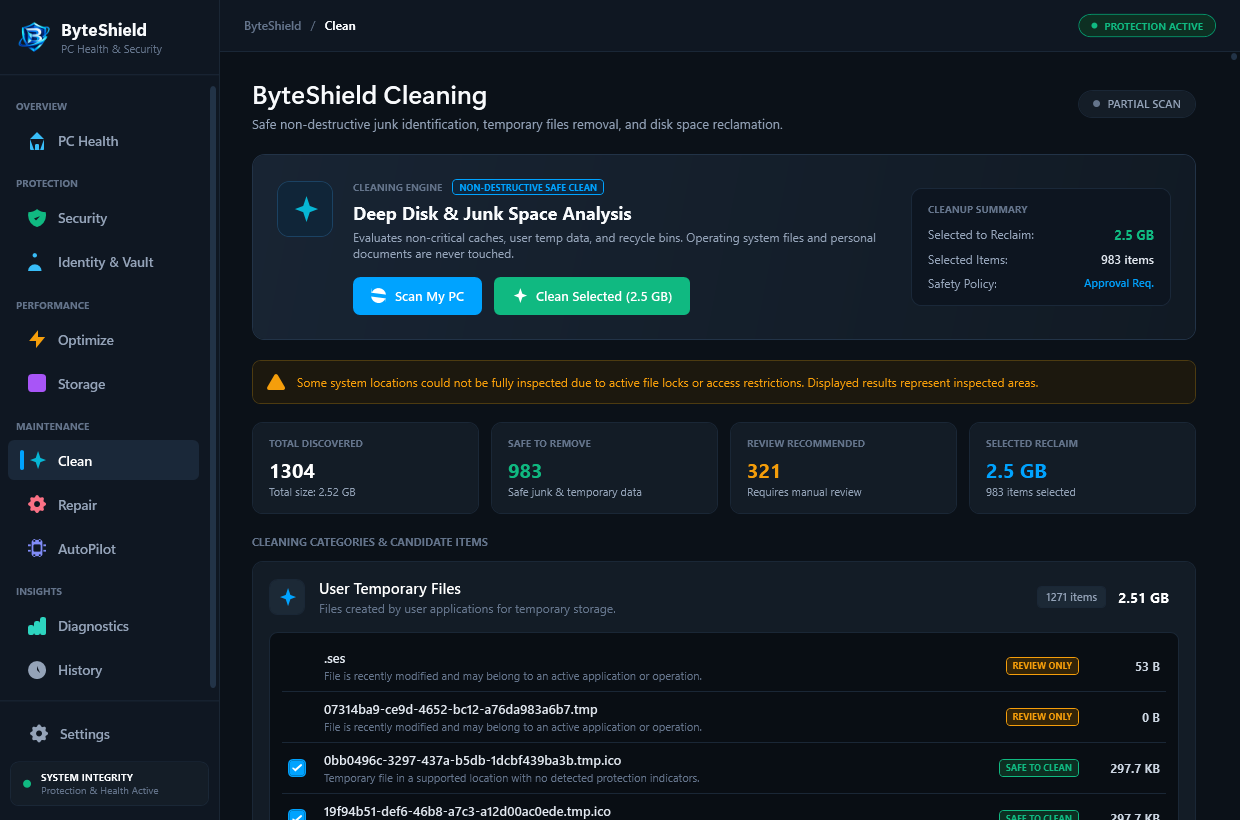
Reclaimed from obsolete Windows update staging logs
Zero blind registry wiping eliminates software crashes
High-speed Master File Table (MFT) indexing
Every action generates an internal recovery point
What ByteShield Cleans (And What It Protects)
We focus exclusively on disposable cache targets, preserving your personal files and application configurations.
Windows Update Artifacts
Targets obsolete installation packages in C:\Windows\SoftwareDistribution\Download and staging caches left behind after Patch Tuesday updates without breaking future rollouts.
User & System Temp Files
Purges stale lockfiles and orphaned uncompressed installers in %LOCALAPPDATA%\Temp and C:\Windows\Temp older than 48 hours, keeping active software safe.
Browser & GPU Shader Caches
Cleans bloated WebGL and DirectX shader caches from Google Chrome, Microsoft Edge, and game launchers without logging you out of your accounts or deleting form auto-fill data.
How the Review-First Workflow Operates
Experience transparent system maintenance that keeps you in command at every stage.
High-Speed Indexing
ByteShield analyzes disk volumes via the Master File Table, discovering gigabytes of candidate cache data in under 3 seconds.
Itemized File Preview
Every folder and file is itemized with exact path, creation timestamp, and file size. Sort by size or category with ease.
Exclusion Customization
Easily uncheck specific folders or add custom file paths to your permanent exclusion whitelist with a single click.
Safe Execution & Log
Approved items are purged safely, and a complete rollback manifest is written locally for complete peace of mind.
Frequently Asked System Cleaning Questions
Answers to key questions regarding data safety, browser hygiene, and registry protection.
No. By default, ByteShield preserves all saved passwords, browser login cookies, active session tabs, and form auto-fill data. We only target heavy disk caches such as obsolete web graphics blobs, cached video fragments, and DirectX GPU shader blobs.
Modern 64-bit Windows operating systems do not benefit from blind registry deletion. Aggressive registry cleaners often break application licenses, COM interfaces, and Windows update routines. ByteShield only inspects verified orphaned path keys and always creates a rollback manifest before applying any changes.
Yes. Once Windows updates have been installed, the downloaded setup files inside SoftwareDistribution are redundant staging copies that frequently consume 10GB to 30GB of space. ByteShield safely clears these staging archives without corrupting your operating system update history.
ByteShield checks active process file handles using native Windows file lock APIs. If a file is currently opened by an active program (such as Word, Photoshop, or your browser), ByteShield skips the file to ensure no application encounters data loss.
Open the System Cleaner module, click "Cleaning History & Rollback" in the upper right corner, select the session timestamp you wish to revert, and click "Restore Selected Session". ByteShield restores the original state within seconds.
Both. On SSD and NVMe drives, keeping free storage space above 20% allows the drive controller to perform wear leveling and TRIM garbage collection efficiently, preventing write speed slowdowns. Furthermore, clearing bloated browser and shader caches resolves micro-stutters during app launches.
Reclaim Gigabytes of Wasted Disk Space
Download the free 7-day trial of ByteShield and review all recoverable space on your PC.